The Apple's New Gadget ||||| Apple Watch |||||
- rajoota

- Nov 20, 2015
- 8 min read


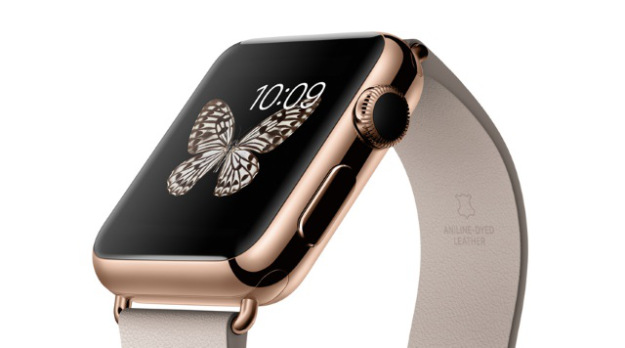


APPLE WATCH
The watch reimagined.
It delivers important information when and where you need it. Helps you easily perform everyday tasks in seconds. Instantly connects you to the people and things you care about most. All while keeping precise time. Yes, it’s a watch. But unlike any you’ve ever imagined.
Notifications. You’ll know it when you feel it.
Because Apple Watch sits on your wrist, it can give you a gentle tap the instant you receive an alert. So you can get the same notifications you do on your iPhone — or just the ones you care about most — more immediately and conveniently.
By gently tapping you, Apple Watch adds a physical dimension to notifications. You can also choose to receive subtle audio cues from the built-in speaker.
Get alerts from all sorts of apps.
Messages
When you get a message, raise your wrist to see who it’s from. Keep it raised to read the whole message.
Calendar
See what’s ahead on your schedule and accept or decline invitations. You can even receive a tap to tell you when it’s time to leave for your next appointment.
Activity
Get alerts that motivate you to meet your fitness goals. For example, if you’ve been sitting too long, a tap reminds you to stand.
Phone
See who’s calling without having to reach for your phone. Answer quickly on your watch, dismiss, or transfer to iPhone for longer calls.
Choose the people you want to receive email from on your wrist. Then get a tap when a new message arrives.
CNN
Breaking news notifications come straight to your watch. Or you can use Apple Watch to launch CNN TV live on your iPhone.
Choose specific users and receive their images and posts directly on your Apple Watch.
Get a gentle tap when new tweets are posted, and retweet or favourite them from your Apple Watch.
Onefootball
Get reminders of upcoming events, and live updates during the match. Then instantly know the final score — all on your Apple Watch.
Need something done? Just ask Siri.
Of all the ways to interact with Apple Watch, Siri may be the quickest. And the most fun. To access it, just press and hold the Digital Crown. Or, if your hands are full, simply raise your wrist and say “Hey Siri” for help with all kinds of things.
Wallet. Fast, safe and always just there.
Wallet lets you keep your boarding passes, tickets and loyalty cards right on your wrist, and alerts you when it’s time to use them.
Stay in touch like never before.
You won’t just send and receive messages, calls and mail more easily and efficiently. You’ll express yourself in unique, fun and more personal ways. Communicating with Apple Watch is discreet, sophisticated and nuanced — a whole new way to connect with others.
Messages, calls and mail. Designed for your wrist.
The ways you communicate on your iPhone are even more immediate on Apple Watch. To read a message or email, just raise your wrist. Then reply instantly by dictating or choosing a preset or customised response. You can take a quick phone call using the built-in speaker and microphone. Or for longer conversations, transfer the call to your iPhone.
Easy ways to respond.
You don’t always have time to craft a lengthy response to a message or email. With Apple Watch, you have lots of options for making a quick but meaningful reply. You can even tap to send short, preset phrases based on the context of your message and how you respond most often.
Handoff. Start on Apple Watch. Continue on iPhone.
Apple Watch is ideal for quick responses, but sometimes you want to say or do more. So we made it easy to switch seamlessly from your Apple Watch to your iPhone. Just swipe up on the corresponding icon in the lower left of your iPhone Lock screen, and pick up where you left off.
Say it with feeling.
You don’t even have to use words. The Digital Touch feature on Apple Watch gives you fun, spontaneous ways to connect with other Apple Watch wearers, wrist to wrist.
Sketch
Use your finger to draw something quickly with as many colours as you want. Your friend on the other end can watch your drawing animate, then respond with a custom creation for you.
Tap
Let friends or loved ones know you’re thinking of them with silent, gentle tap patterns they’ll feel on the wrist. You can even customise taps for different people.
Heartbeat
When you rest two fingers on the screen, the built-in heart rate sensor records and sends your heartbeat. It’s a simple and intimate way to tell someone how you feel.
The people you care about are closer than ever.
Now your inner circle is always nearby. Press the side button to access Friends, where you’ll see thumbnails of the people you stay in touch with most. You can have multiple Friends screens, each of which can hold up to 12 contacts, and you can add friends direct from your watch.
Apps built with the wrist in mind.
Unlike with your iPhone or Mac, you interact with Apple Watch for just a few seconds at a time, often while you’re on the go. And the apps designed for it reflect that. With just a glance, tap or quick Siri request, you can get a lot done. Then go straight back to what you were doing.
Familiar apps in a brand-new form.
The iPhone apps you use every day have been completely rethought and redesigned. Not simply smaller versions, they’re tailored just for Apple Watch. In fact, you might find that some of your favourite apps are even more handy to use when they’re on your wrist.
Maps
Find your location and send it to a friend straight from your wrist. Include public transport in your trip.* Or ask Siri to find petrol stations, shops and points of interest.
Music
Control the music on your iPhone. Or leave your iPhone at home and listen to your favourite synced playlist from Apple Watch using wireless Bluetooth headphones.
Remote
Now you never have to worry about losing the remote. Use Apple Watch to control your Apple TV or music on your Mac or PC.
App Store apps. All-new ways to do all kinds of things.
Open your hotel room door. Feed the parking meter. Even learn a new language. Developers are coming up with new ways to use Apple Watch all the time. So chances are the watch you wear next week will be different from the one you’re wearing today. And even more indispensable.
Lifesum
Easily track how much food and water you’ve had during the day. Pick the right foods and portion size for your next meal. And know which foods to avoid.
Nike+
Take your iPhone on a run but keep it in your pocket. The Nike+ Running app puts your distance, duration and pace on your Apple Watch.
Runtastic Six Pack
Start a training session and see helpful 3D avatars displayed right on your Apple Watch. You’ll also be able to monitor your training plan, level and schedule.
Kitchen Stories
Pick a recipe, and a shopping list is automatically added to your reminders. And when you’re cooking, step-by-step instructions make recipes simple to follow.
Words With Friends
Play the world’s most popular mobile word game on a board designed just for Apple Watch. Think fast and challenge your friends with new Fast Play.
Rules!
Get your daily brain workout with this twitch-puzzle game. Each mind exercise is hosted by animated characters that lead you through 10 different stages towards a daily goal.
Invoice2go Plus
Track your time on the job more accurately than ever. You can also modify your times, send an invoice and receive a notification when you’ve been paid.
Evernote
Dictate a quick note. View recent notes. Set reminders. See content related to upcoming meetings. And get even more convenient access to key features.
Calcbot
Perform basic calculations, convert units, calculate tips and split bills – more conveniently than ever.
Babbel
Have fun learning new languages wherever you are in the world. You’ll see words relevant to your location, so you can learn terms related to food, travel, hotels and more.
At its heart, an incredibly precise timepiece.
High-quality watches have long been defined by their ability to keep unfailingly accurate time, and Apple Watch is no exception. In conjunction with your iPhone, it keeps time to within 50 milliseconds of the definitive global time standard. It even lets you customise your watch face to present time in a more meaningful, personal context that’s relevant to your life and schedule.
Watch faces. Millions of ways to see time.
A device you wear is unlike one you put in your bag or pocket, because it makes a bigger statement about your personal style. Apple Watch faces are designed to be extensively customisable, from the way they look to how they function. So you can combine different styles, colours and complications to create a watch face that’s perfect for you.
Chronograph
Colour
Modular
Utility
Mickey Mouse
Simple
Motion
Solar
Astronomy
Time Lapse
Photo
Photo Album
Complications. Made simple.
Many watches include a few specialised functions — known in watchmaking as complications — that go beyond telling the time. But Apple Watch comes with a full range. Some are traditional, like moon phases or sunrises and sunsets. And some are more modern, like stock quotes, weather reports and a daily activity tracker. You can even put information from your favourite App Store apps on your watch face.
Activity
Monitor how active you are throughout the day.
Alarm
Set an alarm. Or more than one.
Calendar
Take a quick look at what’s next on your schedule.
Moon Phase
See how much of the moon will be visible that night.
Stocks
Get real-time quotes for the stocks you follow most.
Stopwatch
Start and stop anytime, directly from the watch face.
Sunrise/Sunset
See when day turns into night, and vice versa.
Timer
Set a timer and see how much time is remaining.
Weather
See the current temperature of anywhere in the world.
World Clock
Follow time across the country or around the globe.
Glances. Just the right amount of information, right when you want it.
Glances are scannable summaries of the information you seek out most frequently. To access them, simply swipe up from your watch face. You’ll instantly be able to do things like see what’s next on your calendar or find your location on a map. Tap any Glance to open its corresponding app.
Weather
See the current temperature and conditions, and the day’s highs and lows.
Heart Rate
Quickly check your heart rate, no matter what you’re doing.
Calendar
See what’s on your schedule and receive a notification when it’s time to leave for your next appointment.
Innovation in every interaction.
Apple Watch is unlike any device we’ve ever made. But we wanted interacting with it to be just as easy and intuitive as using your iPhone or working on a Mac. So we invented all-new ways to select, navigate and input that are ideally suited to a smaller device worn on the wrist. The result is an experience that’s both unique to Apple Watch and quintessentially Apple.
Digital Crown. A modern twist on a traditional feature.
On mechanical watches, the crown has historically been used to set the time and wind the mainspring. We reimagined it as a versatile tool that answers the fundamental challenge of how to navigate on a small display. You can turn the Digital Crown to zoom in and out of photos, scroll through lists and make selections, all without obstructing your view. With Time Travel, turning the Digital Crown lets you scroll through your complications to see what’s happening — or what’s already happened — yesterday, today and tomorrow. Pressing it returns you to the present time.
Force Touch. Sensitive enough to tell a tap from a press.
In addition to recognising touch, Apple Watch senses force, adding a new dimension to the user interface. With Force Touch, pressing firmly on the display brings up additional controls in apps such as Messages, Music and Calendar. It also lets you do things like select different watch faces, pause or end a workout, and search for an address in Maps.
Taptic Engine. Technology with a more human touch.
This linear actuator inside Apple Watch taps you on the wrist when you receive a notification, press down on the display or use Digital Touch. The Taptic Engine gives different kinds of notifications and actions their own distinctive character. So even with the accompanying audio cues turned off, you can feel the difference between an alarm and an incoming phone call without even looking.


Comments